Databasin vs Tableau
Choose Databasin when reporting needs a team to connect sources, establish shared measures and deliver the application. Choose Tableau when visual exploration and the workbooks your analysts build are central to the work. You can also keep Tableau while Databasin improves the data behind it. The choice should follow how people need to use the answers.
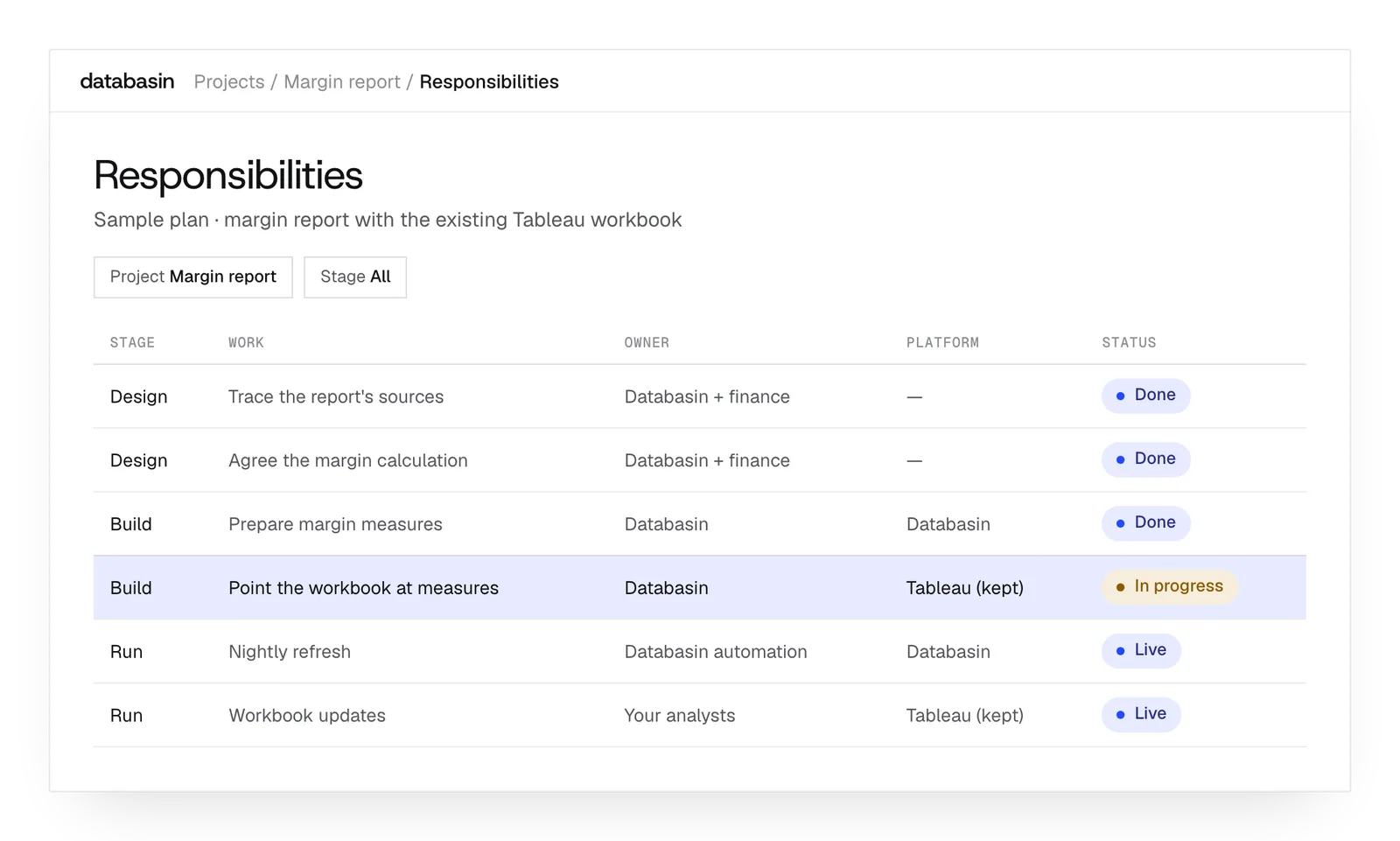
 databasinvs

Choose by the reporting work
Choose Databasin if…
- You want the team preparing the data to deliver the reporting experience too.
- Recurring reports need consistent measures across several connected systems.
- You want rollout, training and continuing help with the implementation.
Choose Tableau if…
- Your analysts need to develop and explore data through visual workbooks.
- Existing workbooks already support the decisions people need to make.
- Your team or partner can manage source preparation and reporting development.
What does each approach cover?
| Criterion | Databasin | Tableau |
|---|---|---|
| Main offer | Reporting improvement with an implementation team | Visual analytics and reporting platform |
| Source preparation | Team implements connections and business views | Prep and source tools support your builders |
| Shared measures | Defined and implemented during the engagement | Developed within your models and workbooks |
| User interaction | Data Apps and plain-English questions | Interactive visual exploration and workbook development |
| Adoption | Rollout and training included in delivery | Organized by the selected implementation team |
| Ongoing work | Managed operation or agreed support | Workbook and source ownership in your arrangement |
Preparation
Who prepares the measures people use?
Databasin
We connect the sources and establish the meaning of the report's measures. That includes relationships, date rules and calculations. Our team implements them in shared views so people using different reports can work from the same definitions.
- Connect the required business source records
- Implement shared calculations and date rules
- Prepare governed views for reporting
Tableau
Builders use Tableau Prep to combine, shape and clean source records. They develop workbook measures from that prepared data and the available models. The reporting team retains ownership of the definitions those workbooks use.
- Combine and shape source data
- Develop measures for analytical workbooks
- Keep ownership of reusable reporting definitions
Exploration
How do people explore the result?
Databasin
People can build or change a Data App through conversation and ask follow-up questions in Databasin One. The answers include SQL, so someone can examine the calculation. Our team prepares the shared records and definitions those questions use.
- Change Data Apps through plain language
- Ask follow-up questions over shared data
- Inspect the SQL behind analytical answers
Tableau
Analysts explore data visually and build interactive workbooks in Tableau. They can share those views through Cloud or Server. This fits people who want to develop the visual analysis themselves and give others a workbook for investigating the results.
- Explore data through interactive visualizations
- Build workbooks around analytical questions
- Share reporting through Cloud or Server
Rollout
Who completes and supports the rollout?
Databasin
We help people put the completed reporting work to use. Communication, training and success measurement are included in delivery. Our team can then operate it, support it each month or stay on call, depending on the help the organization wants.
- Include communication and training in delivery
- Measure the intended business improvement
- Agree the continuing operating support
Tableau
An internal team or partner can maintain the preparation work and workbooks, then arrange rollout to their audience. Tableau offers hosted and self-hosted deployment choices. The reporting team selects the arrangement and continues developing the analytical experience.
- Choose hosted or self-hosted deployment
- Assign owners for workbook changes
- Organize adoption around the reporting audience
Keep the workbook or rebuild
Databasin
Improve the complete reporting process with delivery support
Recurring preparation, inconsistent definitions or source problems can make a report hard to use. Databasin can address that work and deliver the reporting experience with it. We can build a Data App or continue supplying Tableau when the current workbooks still serve users.
- Reports require repeated manual preparation across systems
- Different workbooks disagree about the same measure
- Implementation needs help across data and user adoption
Tableau
Retain useful visual analysis and develop it further
Tableau fits when people use its workbooks effectively and the authors can develop the next improvement. More reliable sources or consistent definitions may solve the problem. In that case, the business can keep the visual experience its users already know.
- People use the existing workbooks effectively
- Specialist visual analysis remains central to the job
- Authors can support further workbook development
What happens next
We would like to hear where your team wants to make progress with data and AI. We can discuss a project you have in mind or explore where Databasin could help with the work.
What happens next
Book a demo
Book a conversation about your organization and the work you want to improve. Questions about where to start are welcome.
Explore the opportunity
We show a working example that answers your business questions, then discuss what it would take to deliver it for your team.
Get the first result
After agreeing the first use case, we implement it with your team. We train the people using it and measure how it performs.
FAQ
Can Databasin import a Tableau workbook today?
Tableau workbook import is upcoming. A move to Data Apps therefore involves rebuilding the report and checking its calculations, filters and access. Our team can implement that work; keeping Tableau while improving the underlying data is also an option.
How are workbook calculations preserved during a rebuild?
Filters, dates and relationships determine how a workbook calculation behaves. We map that context and compare the replacement with accepted reports for the same periods. The checks include the detail people investigate, so the rebuild preserves more than an agreeing total.
What if a workbook uses a specialist visualization?
We establish which question the visualization answers and what people need to do with it. That guides the choice of a replacement. If the current workbook still serves that job best, we can retain it within the implementation.
Can we assume a different reporting tool will be faster?
We trace the delay through the model, query, refresh and workload. Comparing the same reporting task with the same filters helps identify its cause. That gives the implementation a specific part of the process to improve and a consistent way to judge the result.
How are different viewer permissions tested?
We test what each audience can read and which reporting actions it can perform. Those checks cover the underlying records as well as the visible page. The new interface needs to preserve the access distinctions the business requires.
Can Tableau and Data Apps be used during the same transition?
Yes. People can keep using the existing workbooks while we build and compare the new application. We can prepare the shared data first and introduce the new experience where it helps. Each report then moves for a defined purpose.
Will a Data App fix a late source refresh?
A report only shows the records that have reached it. We therefore examine the source refresh and downstream calculations along with the Data App. Our team coordinates that sequence around when people need the answer, addressing the source work behind the delay.
How is the first reporting improvement delivered?
Design establishes the intended outcome and the data and reporting work needed to achieve it. Databasin's offer is a first use case live in 90 days, including communication, rollout and training. Continuing support follows the arrangement agreed for the implemented work.
Discuss your reporting experience
Talk with us about the reports people use and the answers they still have to assemble by hand. We can explore where Databasin would help, including the data work, reporting experience and support needed afterwards.